Subscriptions
Canceling Your Subscription
- Sign into Bird Academy.
- Navigate to the My Subscriptions page.
- Click on your active subscription.
- Click the Cancel button.
- You will have access to our learning tool until the end of the current billing period.
- Your subscription will no longer be renewed.
- Your subscription can be reactivated before the start of the new billing period.
- To resubscribe after the new billing period, a new subscription can be purchased.

Redeeming a Gift Subscription
- Click on the link that looks like a coupon in the email.
- You will be on the page for the subscription you were given.
- Click on the Sign Up Now button.
- You need to have a Bird Academy account to proceed. If you already have an account, click the Login now link (at the bottom) and sign in. If not, click the Create Your Account button and create an account.
- Once you’re signed in you will be sent back to the Checkout page. Fill out your personal information and confirm that the price is still $0, then click Continue.
Adding a Payment Method to a Gifted Subscription
- A gifted subscription will be canceled automatically after a year. In order to have it renew, a payment method must be added.
- Navigate to the My Subscriptions page.
- Click View on your active subscription.
- Click Add Payment.
- Enter your card information, then click Add Payment Method.

Gifting a Subscription
- We offer a one year BirdWise gift subscription.
- Enter the date you want this gift to be delivered on.
- Enter the email address of the person you’re sending this gift to.
- Optionally enter a gift message.
- Provide your billing details and your email.
- Complete the checkout process.
- An coupon for BirdWise will be delivered to the email of the giftee (they may have to check their promotions or spam folder).
- Your receipt will be delivered to your inbox… and done!
- Want something to tuck into a card? Print this gift note.
- The subscription begins when the giftee redeems it, not when you purchase it.
- The subscription will NOT automatically renew. The giftee can add their own payment method to allow for renewal.
Subscription Renewal
- Your subscription will automatically renew at the end of the pay period.
- You will receive an email when your payment goes through with your payment method on file.
Payment Failure upon Subscription Renewal
- In some cases, the attempt to charge your payment method on file may fail.
- In the case of a payment failure, you will lose access to BirdWise.
- Several more attempts to charge it will be made over the next 5 days. You will receive emails if these attempts succeed or fail.
- Attempts to charge will stop after 5 days.
- A link within the email will allow you to reactivate the subscription with a new payment method.
Switching Subscriptions
- You can switch the type of subscription you have from the My Subscriptions page. Click the View button on the subscription you would like to switch.
- In the Subscription totals section, click on the Switch button.
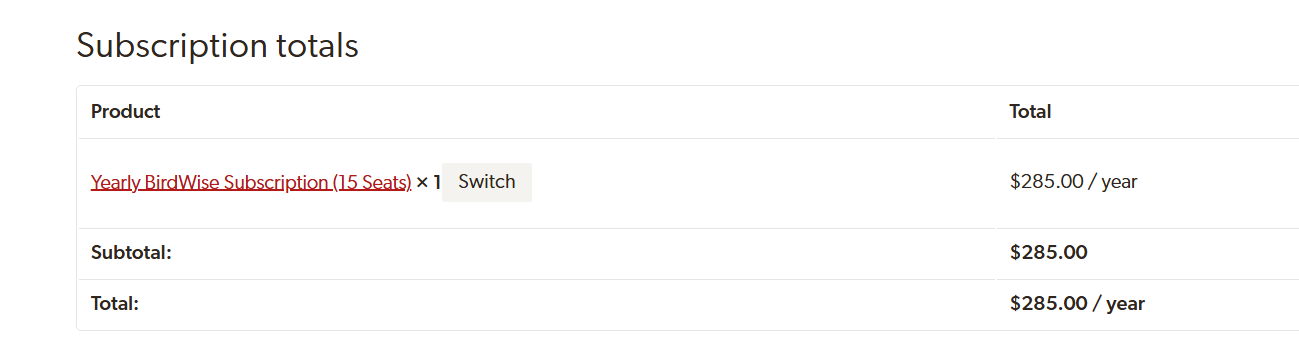
- Choose the type of subscription you would like to switch to and click the Switch Subscription button.
- Upgrading a subscription will charge the difference between the new price and the value of the remaining amount of time on your current subscription.
- Downgrading a subscription will give you additional time on your new subscription for the remaining value of your current subscription.
Did this page answer your question?
If not, let us know. Send us a message and we’ll try our best to help.
Contact Bird Academy Customer Service